
Media alignment (w. neuroconv)#
Tip
The Data wizard on the GUI start page walks you through this. Make a few selections (cameras, microphones, how they are wired) and it writes a Jupyter notebook tailored to your setup.
Your media files (video, audio, pose)… |
Data wizard mode |
|---|---|
already share a clock |
1 Pair media files → |
were logged by a recording system (Intan, Open Ephys, …) |
2 free-running or 3 triggered camera: align with neuroconv → |
An .nwb source is read and edited directly and needs no sidecar.
Pair media files#
On the start page, click Data wizard, prepare my data and choose
1 Pair my media files. Tell it how many cameras and microphones you have
and where the files are. It shows the pairing table, then writes a notebook
with the same calls under wizard/ in the project folder and stops. Run the
notebook: it writes .ethograph/alignment.nwb into the session folder named in
its first cell, and any session.nc you add there. The wizard itself writes
nothing but the notebook, so the notebook stays the one record of how a
session was built; next session, change its first cell and run all.
Two folders are involved and they need not be the same. The session folder
is where Ethograph writes: .ethograph/alignment.nwb, labels, settings and, if
you have features, session.nc. The media folders are where your videos,
pose files and audio already are, one per source, given as absolute paths. They
can sit anywhere: on another drive, one folder per camera, or one folder for
every session with a filename pattern telling the trials apart. When each
session’s videos have a folder of their own, that folder is a perfectly good
session folder, and the wizard proposes it.
The same thing in Python is two calls. discover_media() builds
the pairing table from folders (files in natural sort order) or from a filename
pattern with named groups trial, camera and mic.
pair_media() writes the alignment file:
import ethograph as eto

session_dir = "D:/sessions/2026-09-11"  # receives .ethograph/, labels, session.nc

sources = [
    eto.SourceSpec("video", device="cam-1", folder="E:/cameras/cam1/2026-09-11"),
    eto.SourceSpec("video", device="cam-2", folder="E:/cameras/cam2/2026-09-11"),
    eto.SourceSpec("pose", device="cam-1", folder="D:/dlc/2026-09-11/cam1"),
    eto.SourceSpec("pose", device="cam-2", folder="D:/dlc/2026-09-11/cam2"),
    eto.SourceSpec("audio", device="mic-1", folder="D:/sessions/2026-09-11/audio"),
]
trial_table = eto.discover_media(sources)
print(trial_table)
#    trial                       video_cam-1  ...                              audio_mic-1
# 0      1  E:/cameras/cam1/2026-09-11/t1.mp4  ...  D:/sessions/2026-09-11/audio/mic1_t1.wav
# 1      2  E:/cameras/cam1/2026-09-11/t2.mp4  ...  D:/sessions/2026-09-11/audio/mic1_t2.wav

trial_table["stimulus"] = ["tone_A", "tone_B"]

eto.pair_media(
    trial_table,
    stream_rates={"video": 30.0, "pose": 30.0, "audio": 48000.0},
    output_path=f"{session_dir}/.ethograph/alignment.nwb",
)
When one folder holds every camera, give a pattern instead of a folder:
eto.SourceSpec("video", pattern=r"cam(?P<camera>\d+)_t(?P<trial>\d+)\.mp4").
The camera group becomes the device (cam-1, cam-2) and the trial group
the row.
The pairing table is a plain DataFrame with a trial column
and one {stream}_{device} column per source. You can build it by hand or edit
it before writing.
Files are paired by row, not by name. Row order is trial order and each
{stream}_{device}column is that stream’s file for that trial. The table holds full paths, so it says where every file is. The alignment file stores the basename per trial and the full path per stream; on another machine, the media folder you select in the GUI takes over.Camera index pairs video with pose: device
cam-1overlayspose_cam-1.Extra columns (
stimulus,condition, …) become trial attributes and flow through to label TSV exports.Multi-camera NWB files need no table: each camera is already its own
ImageSeriesinnwb.acquisition.
Trial times#
start_time and stop_time columns are optional. Without them each trial’s
duration is probed from its own media (video first, then audio, then pose) and
the trials are laid end to end from 0.0. Three things follow:
The files must be openable at build time. The table’s paths are probed as they are; a path that does not exist raises
ValueError.Inferred trials are contiguous. The inter-trial gaps of the real recording are erased. Trial-relative time (labels, features, per-trial video) is unaffected, but session time is fiction. Pass real times whenever you have ephys, session-wide media or session-mode navigation to support.
Pose-only tables need
pose_fps=. A pose file has no intrinsic duration.
With real start_time / stop_time the GUI can also navigate in session mode
and restrict neural data to trial windows.
Session-wide streams#
A file that spans every trial (one continuous audio recording, a probe on its
own clock) goes in session_wide, keyed by stream name, with its rate and the
session time at which its first sample was taken:
eto.pair_media(
    trial_table,
    stream_rates={"video": 30.0},
    session_wide={
        "audio_mic-1": ("D:/sessions/2026-09-11/audio/session_ch1.wav", 48000.0, 0.0),
        "ephys_probe-1": ("D:/sessions/2026-09-11/ephys/session.dat", 30000.0, 0.5),
    },
    output_path=f"{session_dir}/.ethograph/alignment.nwb",
)
Session time is then as good as the offset you typed. If you measured the offset from a sync line, use mode 2 or 3 instead and let neuroconv place every frame.
If output_path is an existing .nwb with a trials table, such as a file
neuroconv wrote, the streams are added to it in place. That is how the pose
and audio of modes 2 and 3 join the video
(step 6 below).
Two cameras at different frame rates take a per-device key, which overrides the
stream’s rate: stream_rates={"video": 30.0, "video_cam-2": 60.0}.
There is no timestamps input: per-sample timestamps are neuroconv’s job (see
Align video to a recording system (with neuroconv)).
Ephys is always session-wide: select the file in the GUI rather than listing it in the table. See Ephys recordings for supported formats, Kilosort folder setup and channel mapping.
Align video to a recording system (with neuroconv)#
When a recording system (Intan, Open Ephys, SpikeGLX, …) logged the camera, its clock is the session clock and the video should sit on it frame by frame. That is what neuroconv does. A free-running camera starts with the session and stops with it, in one file or split into several:
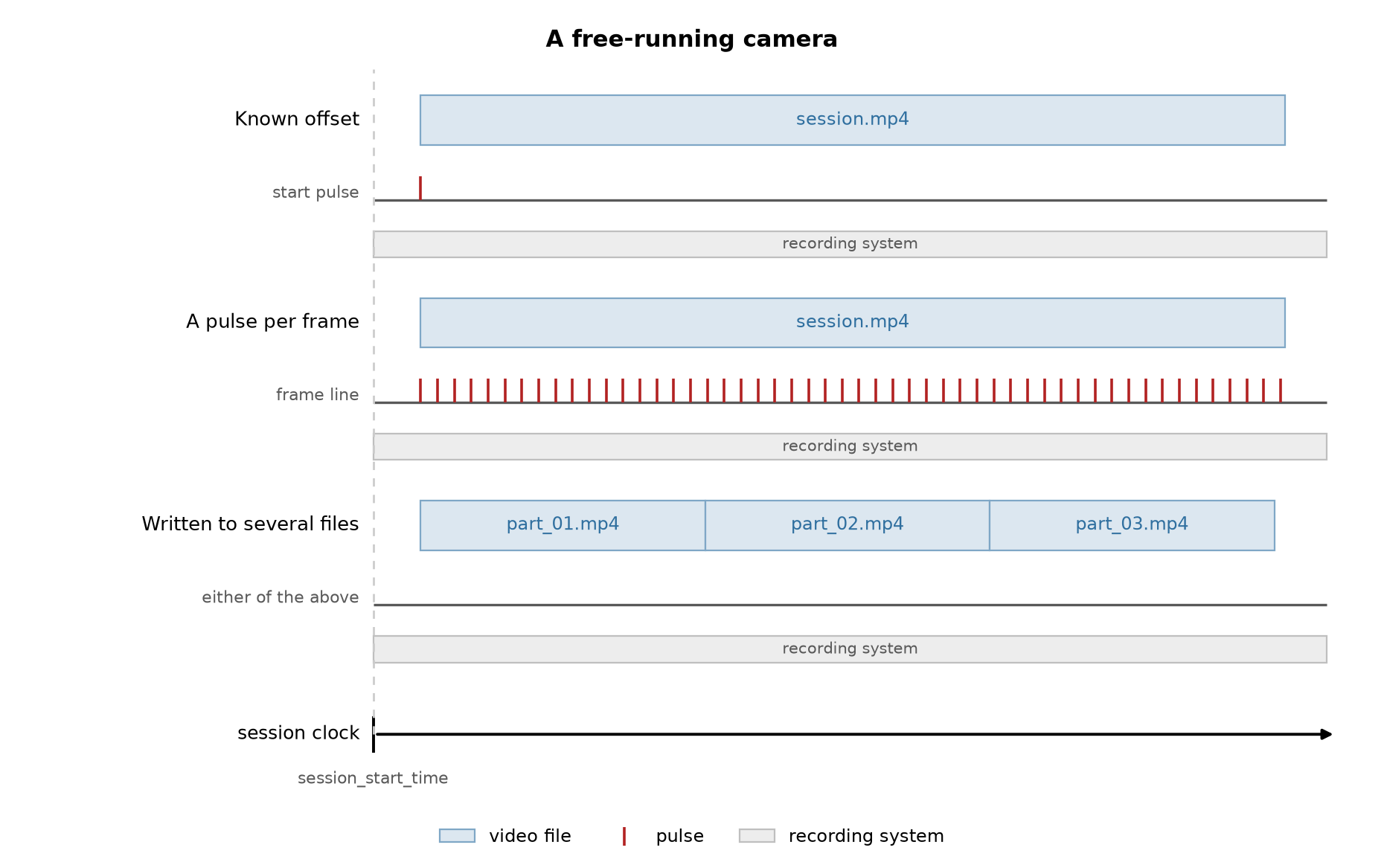
Free-running camera. Figure from neuroconv’s how-to (BSD-3-Clause).#
A triggered camera receives a pulse at each trial onset and writes one file per trial, with gaps between them:
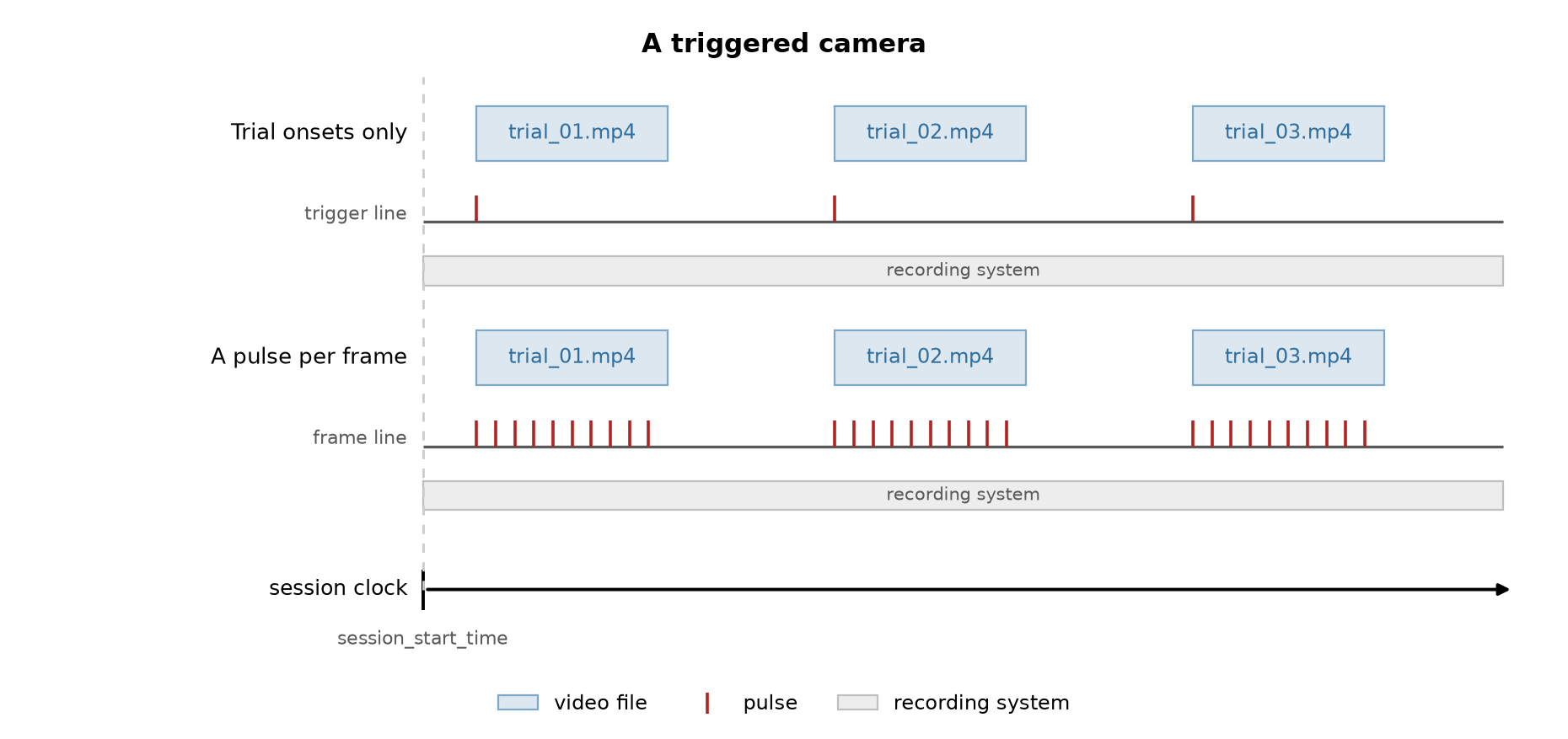
Triggered camera. Figure from neuroconv’s how-to (BSD-3-Clause).#
Choose 2 or 3 in the Data wizard. It asks how the camera is wired (a
known offset, a pulse per frame, or a pulse per trial), writes
wizard/{rig_name}.ipynb in the project folder and stops, exactly as in mode
Run the notebook; it writes
session.nwb, and you open its folder on the start page. The recipes are neuroconv’s own, from its how-to on aligning external video; the walkthrough below follows one rig in the shape of the notebook the wizard writes, and only shows how the recipes meet Ethograph.
Tip
neuroconv is not part of the ethograph environment. Install it with
pip install "neuroconv[intan,video]" (swap the extras for your recording system).
One rig, end to end#
The rig: an Intan recorder writing session.rhd, one free-running camera whose
frame-out pin is wired to DIGITAL-IN-02, and a trial trigger on
DIGITAL-IN-01. The camera reports every exposure, so each frame lands on the
Intan clock and drift is corrected for free.
1. Parameters#
The first cell of the notebook is tagged parameters. It names the session
folder, which receives session.nwb, and every media folder and recorder file
as absolute paths. For the next session on the same rig, change those paths and
run all.
session_dir = "D:/data/rig_A/2026-09-11"
rhd_file = "D:/data/rig_A/2026-09-11/ephys/session.rhd"
nwbfile_path = f"{session_dir}/session.nwb"
2. Find the media#
discover_media() builds the pairing table the same way it
does when you pair media files. For a free-running
camera the table has one row; for a triggered camera it has one row per trial
file.
import ethograph as eto

sources = [
    eto.SourceSpec("video", device="cam-1", folder="D:/data/rig_A/2026-09-11/video"),
    eto.SourceSpec("pose", device="cam-1", folder="D:/data/rig_A/2026-09-11/pose"),
    eto.SourceSpec("audio", device="mic-1", folder="D:/data/rig_A/2026-09-11/audio"),
]
trial_table = eto.discover_media(sources)
video_files = trial_table["video_cam-1"].tolist()  # full paths
3. Read the pulses off the recorder#
from neuroconv.datainterfaces import IntanDigitalInterface, IntanRecordingInterface

recording_interface = IntanRecordingInterface(file_path=rhd_file)
digital_interface = IntanDigitalInterface(
    file_path=rhd_file,
    detection_configuration={
        "DIGITAL-IN-02": [
            {
                "signal_conditioning": {"binarize": "midpoint"},
                "detection": "rising",
                "event_name": "camera_frame",
            }
        ],
        "DIGITAL-IN-01": [
            {
                "signal_conditioning": {"binarize": "midpoint"},
                "detection": "rising",
                "event_name": "trial_trigger",
            }
        ],
    },
)

frame_pulse_times = digital_interface.get_event_times("camera_frame")
trial_onsets = digital_interface.get_event_times("trial_trigger")
4. Place the frames#
from neuroconv.datainterfaces import ExternalVideoInterface

video_interface = ExternalVideoInterface(file_paths=video_files, video_name="video_cam-1")

n_frames = sum(video_interface.get_header_frame_counts())
assert len(frame_pulse_times) == n_frames, f"{len(frame_pulse_times)} pulses for {n_frames} frames"
video_interface.alignment["session"].set_times(frame_pulse_times)
The assertion is the whole point of the wiring. A few pulses short means the camera dropped frames; a few too many means the recorder started before the camera.
5. Write session.nwb#
from neuroconv import ConverterPipe

converter = ConverterPipe(
    data_interfaces={
        "ephys": recording_interface,
        "events": digital_interface,
        "video_cam-1": video_interface,
    }
)
metadata = converter.get_metadata()
metadata["NWBFile"]["session_description"] = "rig A"

nwbfile = converter.create_nwbfile(metadata=metadata)
trial_duration = 5.0
for onset in trial_onsets:
    nwbfile.add_trial(start_time=onset, stop_time=onset + trial_duration)

converter.run_conversion(nwbfile=nwbfile, nwbfile_path=nwbfile_path, metadata=metadata)
The trials table is what turns one session into trials in the GUI. For a triggered camera the how-to’s recipe reads the duration of each trial off its own file instead of a constant.
6. Pair the rest over the .nwb#
Pose and audio share the camera’s clock, so they need no pulses. Pass the
neuroconv file as output_path and pair_media() adds the
streams to it in place, next to the trials it already holds:
eto.pair_media(
    trial_table,
    stream_rates={"pose": 30.0, "audio": 48000.0},
    output_path=nwbfile_path,
)
7. Open it#
On the start page, choose the folder holding session.nwb as the Session
folder in the Custom set-up card and click Load. The ephys trace, the video and the pose overlay all read the same
clock.
The alignment file#
Both routes end in the same kind of file: a sidecar .ethograph/alignment.nwb
or the session.nwb itself.
What it contains#
Concept |
Stored as |
Read via |
|---|---|---|
Trial timing |
|
|
Media files |
one |
|
Stream rates |
|
|
Stream offsets |
|
|
Cameras / mics |
device names parsed from the ImageSeries names |
|
Streams are named {stream}_{device} throughout: video_cam-1, audio_mic-1,
pose_cam-1, ephys_probe-1. The trials table stores basenames and each
stream’s ImageSeries the full paths, so media can move without re-exporting
features: point the GUI at the new folder and the names still match.
Two time conventions meet here. Trial-relative time (onset_s, offset_s,
feature time) starts at 0.0 in every trial, like pose trackers and per-trial
video. Session time (onset_global, ephys timestamps) is measured from the
start of the recording. The trials table converts between them:
onset_global = alignment.start_time(trial) + onset_s.
Reading an existing alignment file#
from ethograph.io.nwb_alignment import NWBAlignment

alignment = NWBAlignment("session_01/.ethograph/alignment.nwb")
print(alignment.trials_df)
print(alignment.cameras)  # ["cam-1", "cam-2"]
print(alignment.mics)  # ["mic-1"]
print(alignment.start_time(1))  # 0.0
alignment.close()
The same interface is exposed via dt.nwb_alignment on a loaded TrialTree and
via app_state.nwb_alignment inside the GUI. See
NWBAlignment for the full API.
Miscellaneous#
If your NWB files contains pose or spike times, you can visualize them for free in the GUI.
Pose. neuroconv’s
DeepLabCutInterface(and the SLEAP and LightningPose ones) write ndx-pose into the same file. Give it the video assource_videoand Ethograph pairs the pose to that camera. Or leave the pose file beside the.nwband pair it withpair_media(), as in step 6; both end up on the same overlay.Spike sorting.
KiloSortSortingInterfacewrites the units, which gives you the raster. The Phy-like viewer reads waveforms straight off the raw binary and still needs the Kilosort folder selected in the GUI.