
Changepoint correction#
Once changepoints are detected, they can be used to refine label boundaries. The correction pipeline snaps hand-drawn label edges to nearby changepoints, producing more consistent annotations.
How it works#
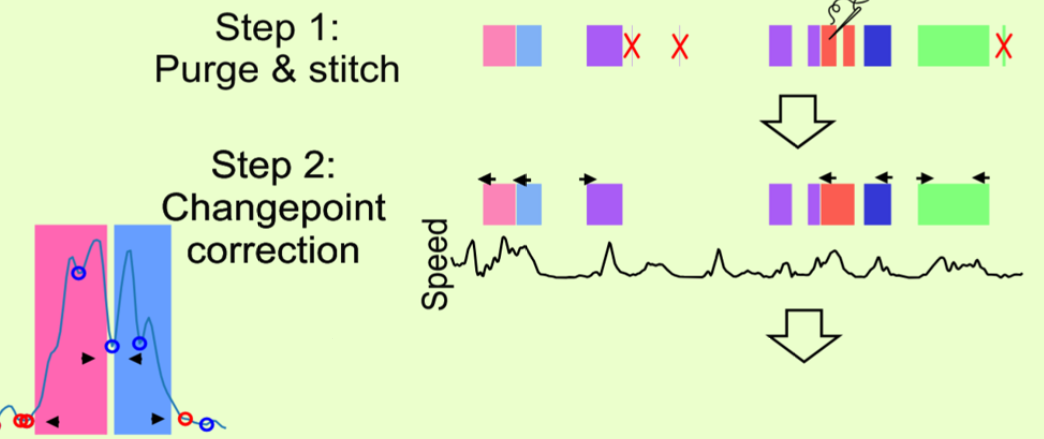
Step 1 drops labels shorter than the minimum duration (red crosses) and merges same-label neighbours across small gaps. Step 2 moves every remaining boundary (arrows) to the nearest changepoint of the feature — here the turning points of a speed trace, shown in the inset as the circles the onset and offset of each label snap to.#
The correction runs four steps in sequence. The figure’s step 1 is the first two; its step 2 is the third:
Purge short intervals — remove labels shorter than the minimum duration.
Stitch gaps — merge adjacent same-label intervals separated by a small gap.
Snap boundaries — move each label’s start/end to the nearest changepoint, constrained by maximum expansion/shrink limits.
Purge short intervals (again) — snapping may create new short intervals.
Parameters#
Parameter |
Description |
|---|---|
Min label length |
Labels shorter than this are removed. |
Stitch gap |
Maximum gap between same-label segments to merge. |
Max expansion |
How far a boundary can move outward toward a changepoint. |
Max shrink |
How far a boundary can move inward toward a changepoint. |
Per-label thresholds |
Override the global min label length for specific label classes. |
These four parameters are set in seconds.
Automatic vs manual correction#
Automatic (during labelling):
Checkbox “Changepoint correction”: When enabled, each click you make while drawing a label snaps to the nearest changepoint drawn on the panel you clicked — a feature panel’s masks for its feature at its own keypoint / individual selection, an audio panel’s audio changepoints — however far away that is. A mark you cannot see on that panel is never a snap target. This keeps hand-drawn annotations consistent in real time.
Manual (post-hoc, bulk application) — in development: Manual correction is especially useful for cleaning up model predictions in bulk — run the detector once, then snap all predicted boundaries to changepoints across the dataset in one step.
Single Trial: Applies the full correction pipeline to the current trial’s labels.
All Trials (Filtered only): Corrects the trials that pass the trials-table filter; each trial where something snapped is marked corrected.
↻ (Undo last manual correction): Reverts the last correction (single or all trials).