
Kinematic changepoints#
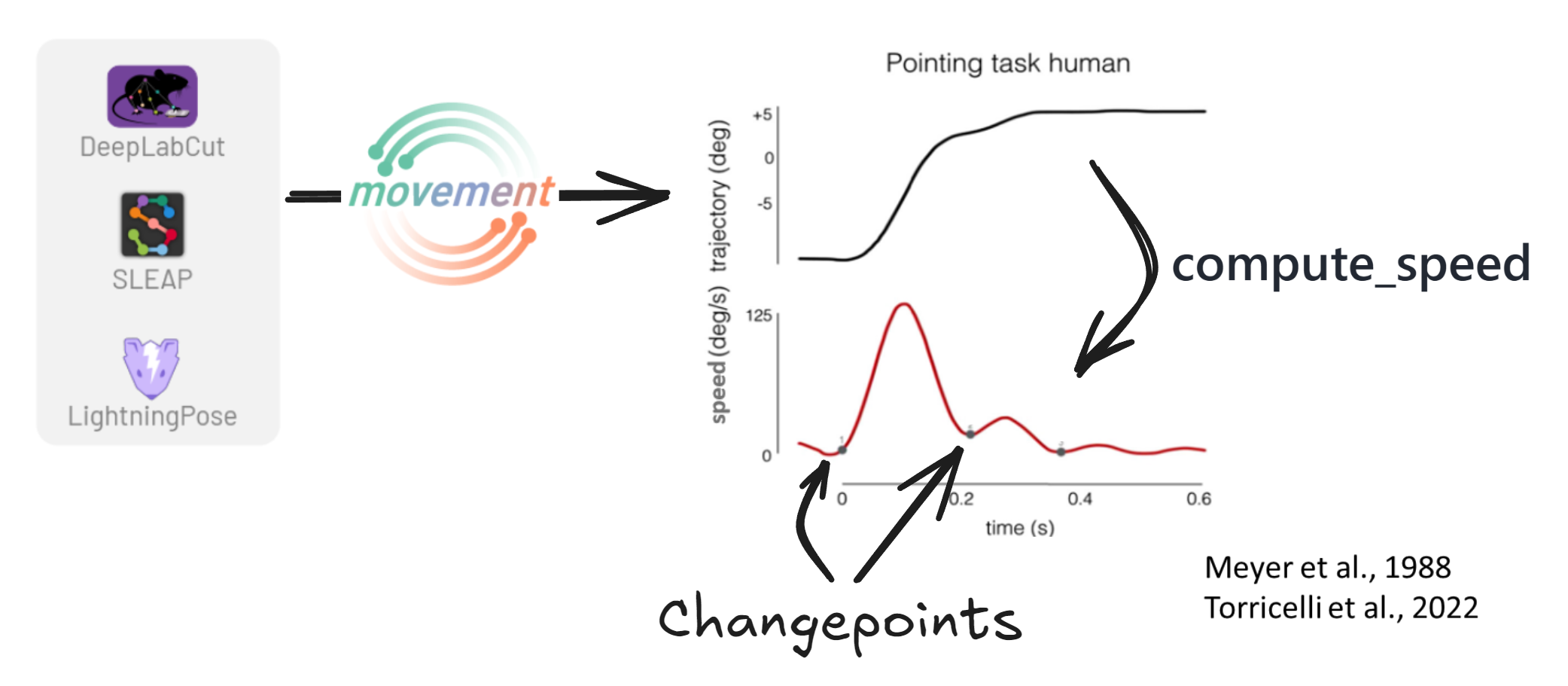
One example of changepoints occurring at behavioural boundaries are speed minima. In point-to-point reaching tasks, the hand speed profile is characterised by a unimodal bell-shaped curve with two speed minima [Torricelli et al., 2023], where the minima correspond to the onset and offset of the movement, and the peak of the speed bump marks the point where the hand starts decelerating. These minima can even be used to identify sub-movements, such as the small second corrective speed bump in the figure below [Meyer et al., 1988].
Troughs (local minima)#
Finds local minima in the signal using scipy.signal.find_peaks applied to
the negated signal. Troughs in speed often correspond to moments where an
animal pauses or reverses direction.
Turning points#
A custom algorithm that identifies the boundaries of peak regions rather than the peaks themselves. The idea is that behaviour transitions happen not at the peak of a movement, but where the animal starts or stops accelerating.
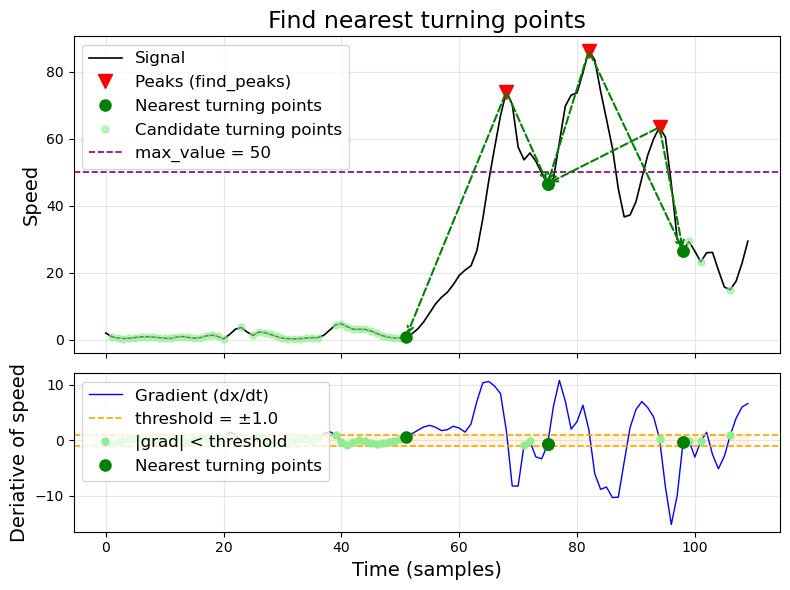
The algorithm works in four steps:
Compute the gradient of the signal and find all indices where
|gradient| < threshold— these are candidate turning points (near-stationary regions).Find peaks in the original signal using
scipy.signal.find_peakswithprominenceandwidthparameters.For each peak, select the closest candidate turning point to its left and right. These define the boundaries of the peak region.
Filter by
max_value: any candidate turning point where the signal exceedsmax_valueis discarded. This prevents selecting turning points on high speed plateaus.
All kinematic changepoints also include NaN-boundary markers — transitions between valid data and NaN gaps are automatically added as changepoints.
Usage#
Detection lives in the top bar: Changepoints ▸ Detect changepoints…. Correction is the next entry, Run changepoint correction…, and opens a pop-up of its own, so the two steps never share a window.
Click a line plot and pick the feature in the sidebar’s Data section (e.g.
speed).Open Changepoints ▸ Detect changepoints… in the top bar; the Kinematic CPs panel is in front.
Choose a method (
troughsorturning_points).Click Configure… to adjust parameters.
Click Detect.
The changepoints are stored in the dataset as {feature}_{method} (e.g.
speed_troughs) and persist when you save.
Tuning the parameters#
Tip
Too many changepoints? With every parameter left at None, both methods
mark every local dip, including the noise between movements. Two parameters
remove most of the irrelevant ones: prominence (how far a through has to dip
below its surroundings, in the feature’s units — see
scipy.signal.peak_prominences()) and distance (the minimum number of
samples between two changepoints). Raise prominence until only the clear
dips remain, then distance to merge the ones that sit right next to each
other. The fastest way to find the values is in the GUI: change one, click
Apply, then Detect, and look at the marks on the plot.
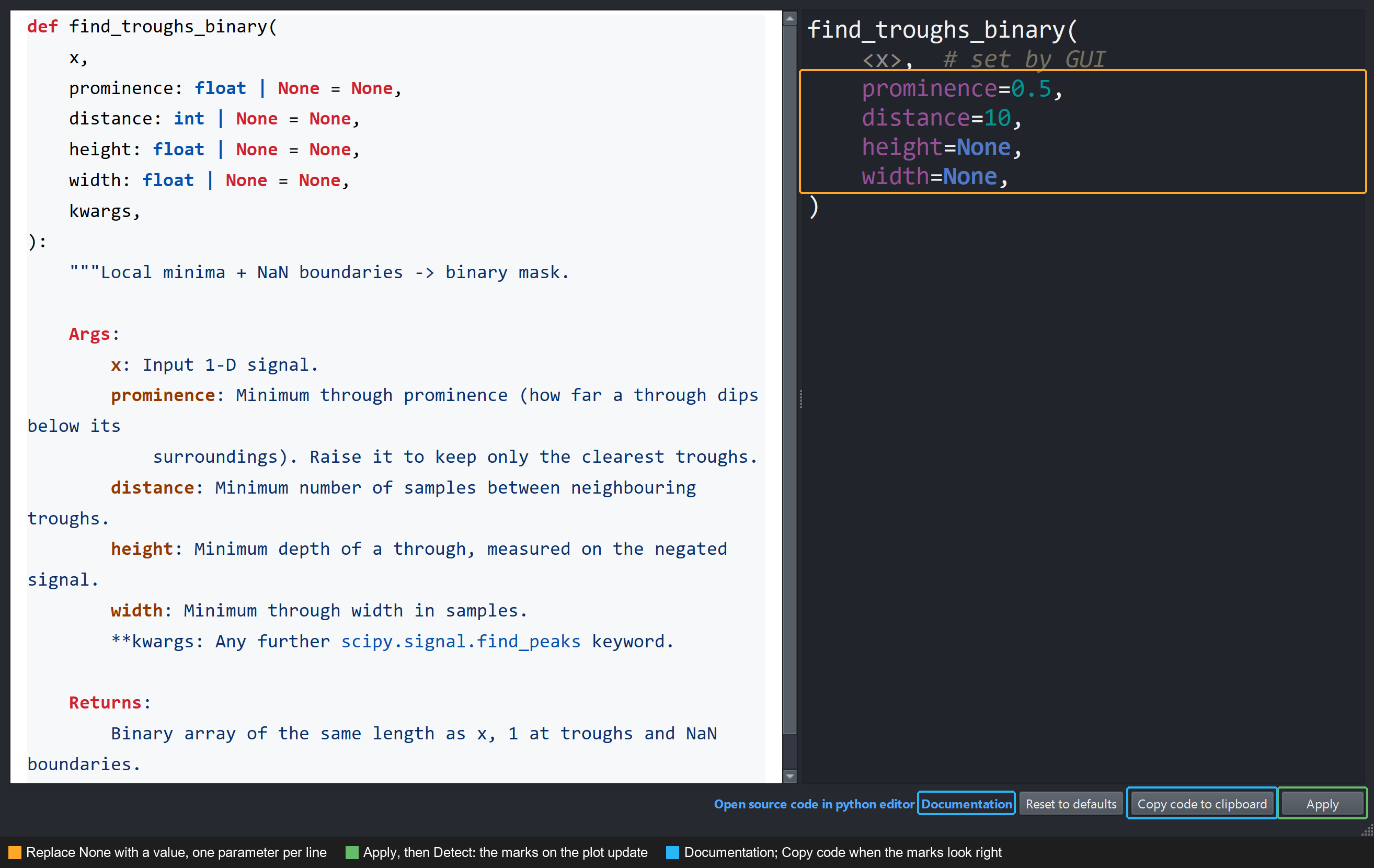
Changepoints ▸ Detect changepoints… ▸ Configure… for troughs. Each
parameter is a line of the call: replace its None with a value, Apply,
and Detect. prominence=0.5 and distance=10 here; height and
width are still off.#
Troughs take scipy.signal.find_peaks()’ own parameters:
prominence, distance, height, width, etc.
Turning points:
Parameter |
Description |
|---|---|
|
Maximum absolute gradient to qualify as a turning point. Lower = only very flat regions. |
|
Discard turning points where signal exceeds this value. |
|
Minimum peak prominence (passed to |
|
Minimum distance between peaks (passed to |
Tip
Play in the GUI, then script it. Once the marks look right, click Copy code to clipboard in the Configure… dialog: it copies the Python call with the parameters you chose. Put that call in the script that builds your dataset, so every session is detected the same way and nobody has to redo the clicks.
Data format#
Compute changepoints with
add_changepoints_to_ds(). It runs the detector
over every non-time dimension through xarray.apply_ufunc() with
vectorize=True, so the detector only has to handle a 1-D signal, and it
stores the result as ds["{target_feature}_{changepoint_name}"] with the
right attrs:
import ethograph as eto
from ethograph.features.changepoints import find_troughs_binary

ds = eto.add_changepoints_to_ds(
    ds,
    target_feature="speed",
    changepoint_name="troughs",
    changepoint_func=find_troughs_binary,
    prominence=0.5,  # ignore dips shallower than 0.5 (feature units)
    distance=10,  # at most one through per 10 samples
)
The stored variable is a binary (0 or 1) integer array on the same time
dimension as its target feature, carrying attrs["target_feature"] (the
feature it annotates) plus the schema stamp written by
changepoint_attrs() (kind="changepoint_feature",
changepoint_mask=1). A mask you computed elsewhere only needs those attrs
to be recognised.
For pynapple data, changepoints are stored as a
TsGroup — one timestamp series per unit (keypoint,
channel, neuron, …) with metadata columns marking it as a changepoint set.
Use add_changepoints_to_nap():
import pynapple as nap
from ethograph.io.pynapple import add_changepoints_to_nap
from ethograph.features.changepoints import find_troughs_binary

speed = nap.TsdFrame(
    t=time_s,
    d=speed_array,  # shape: (n_time, n_keypoints)
    columns=["nose", "left_ear", "right_ear", "tail"],
)

cps = add_changepoints_to_nap(
    speed,
    target_feature="speed",
    changepoint_func=find_troughs_binary,
    prominence=0.1,
)
# cps is a TsGroup — one Ts per column with:
#   metadata.source_label = column name (e.g. "nose")
#   metadata.target_feature = "speed"
#   metadata.kind = "changepoint_feature"   # the same names the xarray side
#   metadata.changepoint_mask = 1           # writes as attrs
Accepts Tsd, TsdFrame, or
TsGroup as input. Existing metadata columns are carried
through when the input is a TsGroup.