
Smoothing and filtering#
Note
The examples on this page follow two tutorials from the
movement documentation,
Filter and interpolate
and Smooth,
and use their data: movement’s wasp sample
(DLC_single-wasp.predictions.h5), a DeepLabCut track of a wasp’s head and
stinger at 40 fps. The functions under Filters and Gaps are
movement’s own.
Tools ▸ Data: Find smoothing parameters… previews a cleaning pipeline over the line plot you clicked while you move the sliders, and hands you the Python that reproduces it. Nothing is written: the preview disappears when the dialog closes, and labels and changepoint snapping keep using the raw values.
The dialog#
Click a line plot, open the dialog from the Tools menu; it follows your later clicks. A pipeline is three stages, run left to right, each holding any number of steps (Add, Remove, drag to reorder):
Filters:
filter_by_confidenceblanks samples below a confidence threshold;rolling_filteris a running median/mean/max/min.Gaps:
bridge_gapsor movement’sinterpolate_over_timefill NaN runs up to a given length.Smoothing: a zero-phase kernel (Gaussian, Savitzky-Golay, median, moving average, Butterworth low-pass) that never creates or removes a gap.
Every parameter is a duration in seconds or a frequency in Hz, never a
sample count: the dialog converts with the plotted data’s own rate, so
window_s=0.1 is 4 frames at 40 fps and 20 at 200 fps. A window too short
for the rate says so in the status line instead of drawing.
To follow along, write movement’s wasp sample as a one-trial session and load that folder from the start page:
import ethograph as eto
from movement import sample_data

ds_wasp = sample_data.fetch_dataset("DLC_single-wasp.predictions.h5")
ds_wasp.attrs["trial"] = 1
eto.from_datasets([ds_wasp]).save("wasp/wasp.nc")
Example 1: drop low-confidence points, then compute speed#
Around the 14th second the stinger’s x position jumps by hundreds of pixels
for a frame or two, and at the very end it falls to zero: the tracker lost the
keypoint, and its confidence says so. Click the position plot, add
filter_by_confidence under Filters and leave the threshold at 0.6.
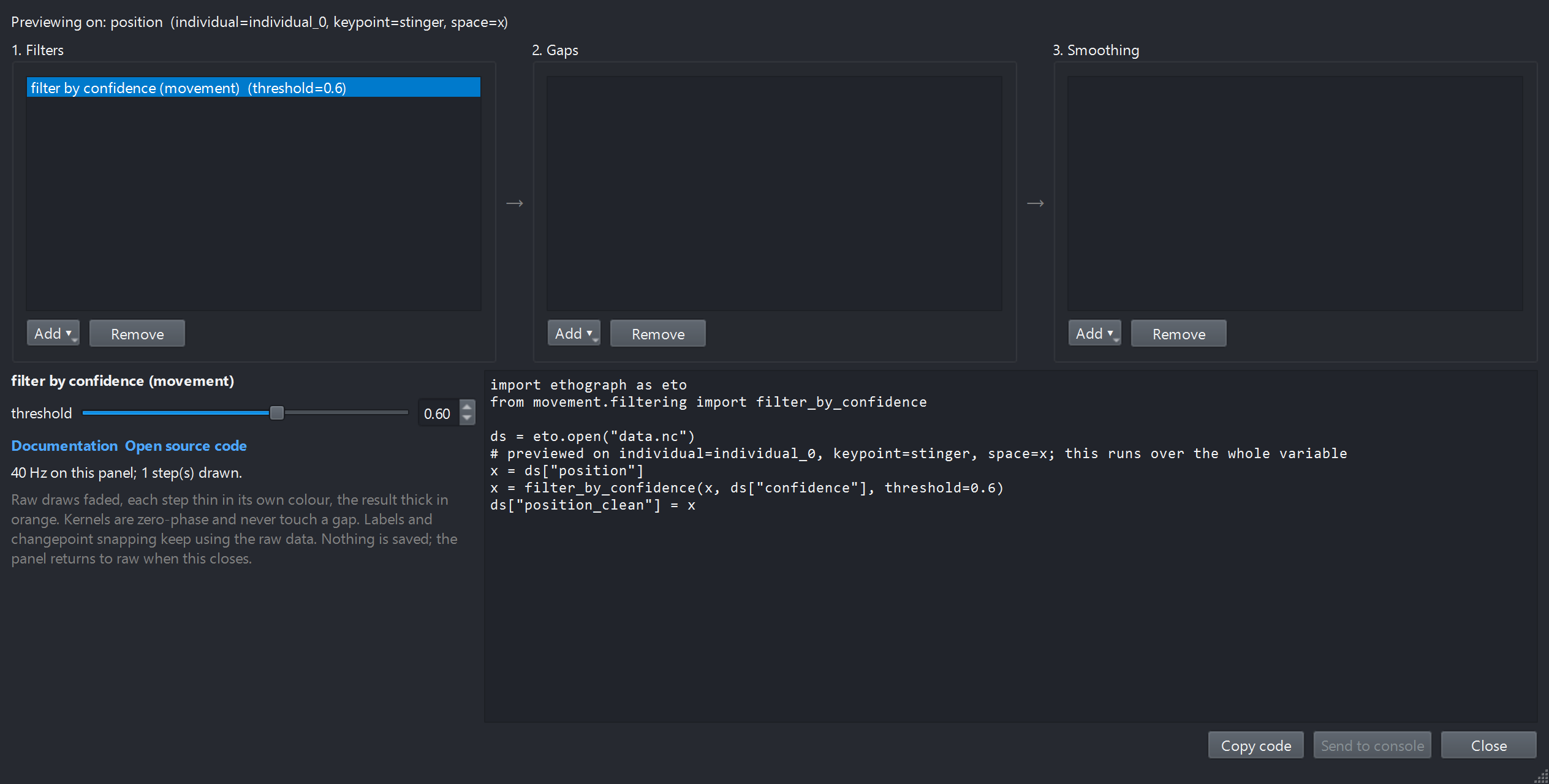
One step. The script on the right is movement’s filter_by_confidence call,
with the threshold you dialled in.#
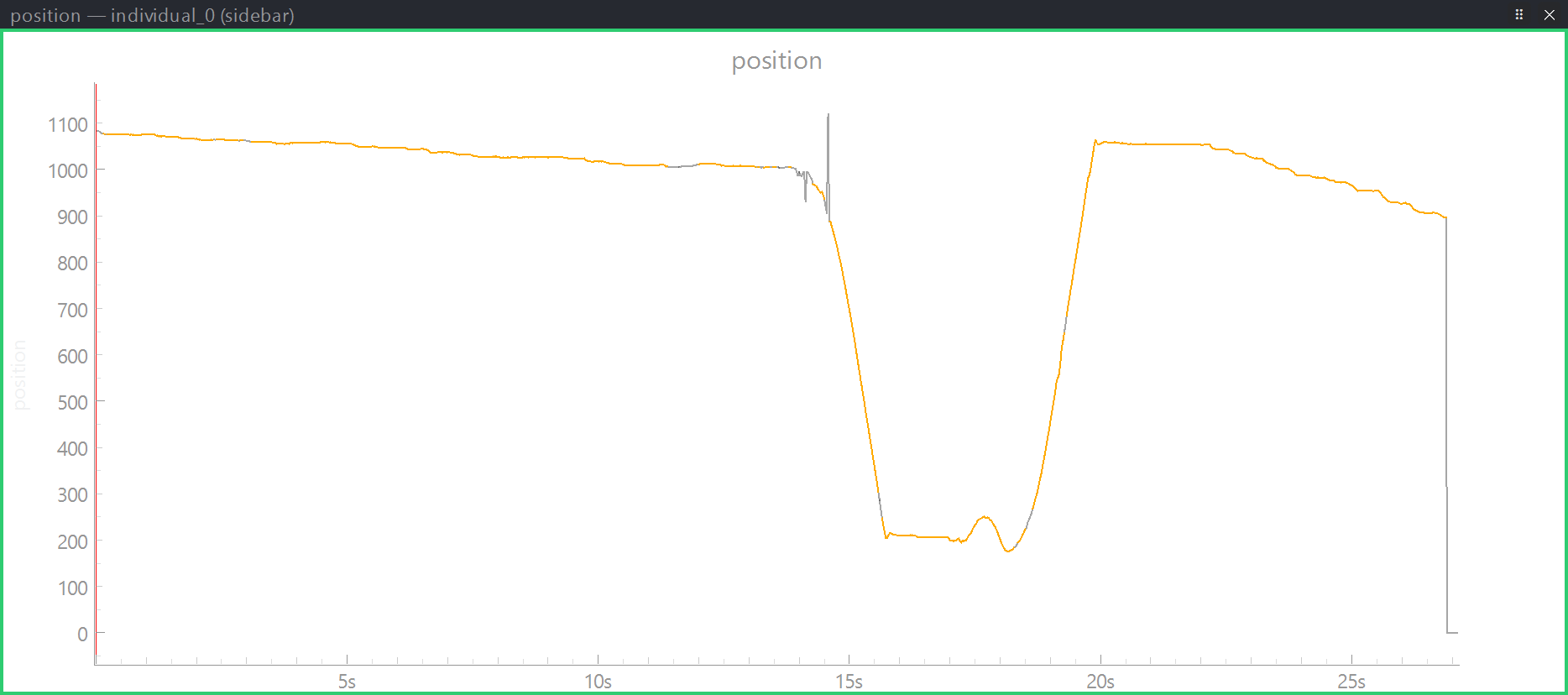
The raw trace draws faded; the result, in orange, has the spikes and the final drop blanked. Nothing else changed.#
Move the slider and the orange trace updates: too low and the spikes stay, too high and good stretches of track disappear. When it looks right, Copy code, then compute speed on the cleaned positions, as movement’s tutorial does, and write the trial back:
import ethograph as eto
from movement.filtering import filter_by_confidence
from movement.kinematics import compute_speed


def clean(ds):
    position = filter_by_confidence(ds["position"], ds["confidence"], threshold=0.6)
    return ds.assign(position_clean=position, speed=compute_speed(position))


dt = eto.open("wasp/wasp.nc")
dt.update_trial(1, clean)
dt.save()
Speed is a derivative, so it amplifies every jump: computing it after the
filter is what keeps the spikes out of it. Save, then
File ▸ Reload data from disk to get speed in the GUI
(Editing the dataset while the GUI is open).
Example 2: median, interpolate, smooth#
The filter leaves gaps, and the track that remains still jitters frame to frame. movement’s smooth tutorial ends with a three-step pipeline: a rolling median against outliers, interpolation over gaps shorter than a second, and a Savitzky-Golay filter for the jitter. The dialog’s three stages are those three steps:
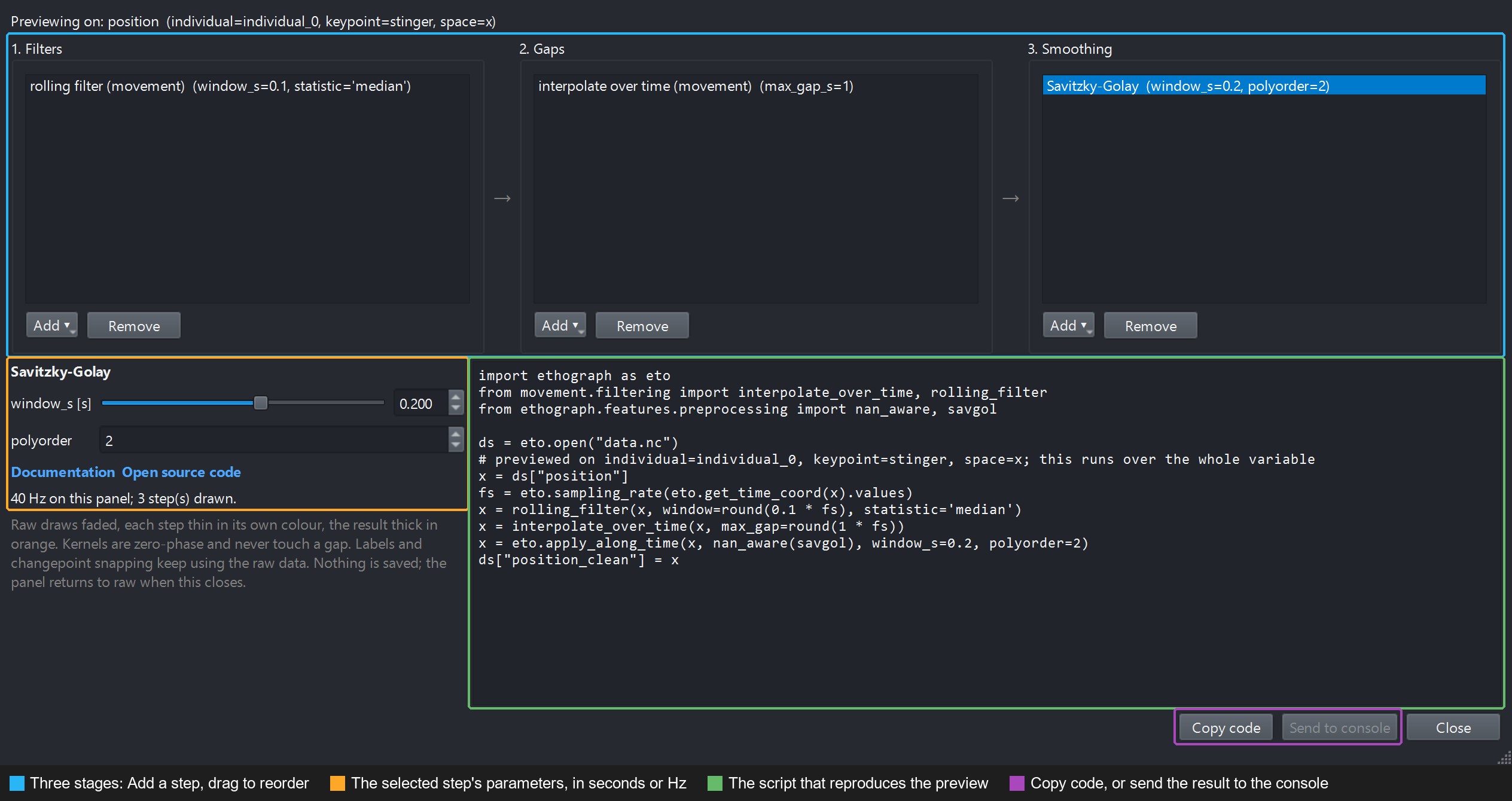
Rolling median (0.1 s), interpolate gaps up to 1 s, Savitzky-Golay over 0.2 s. The script on the right is rewritten on every change.#
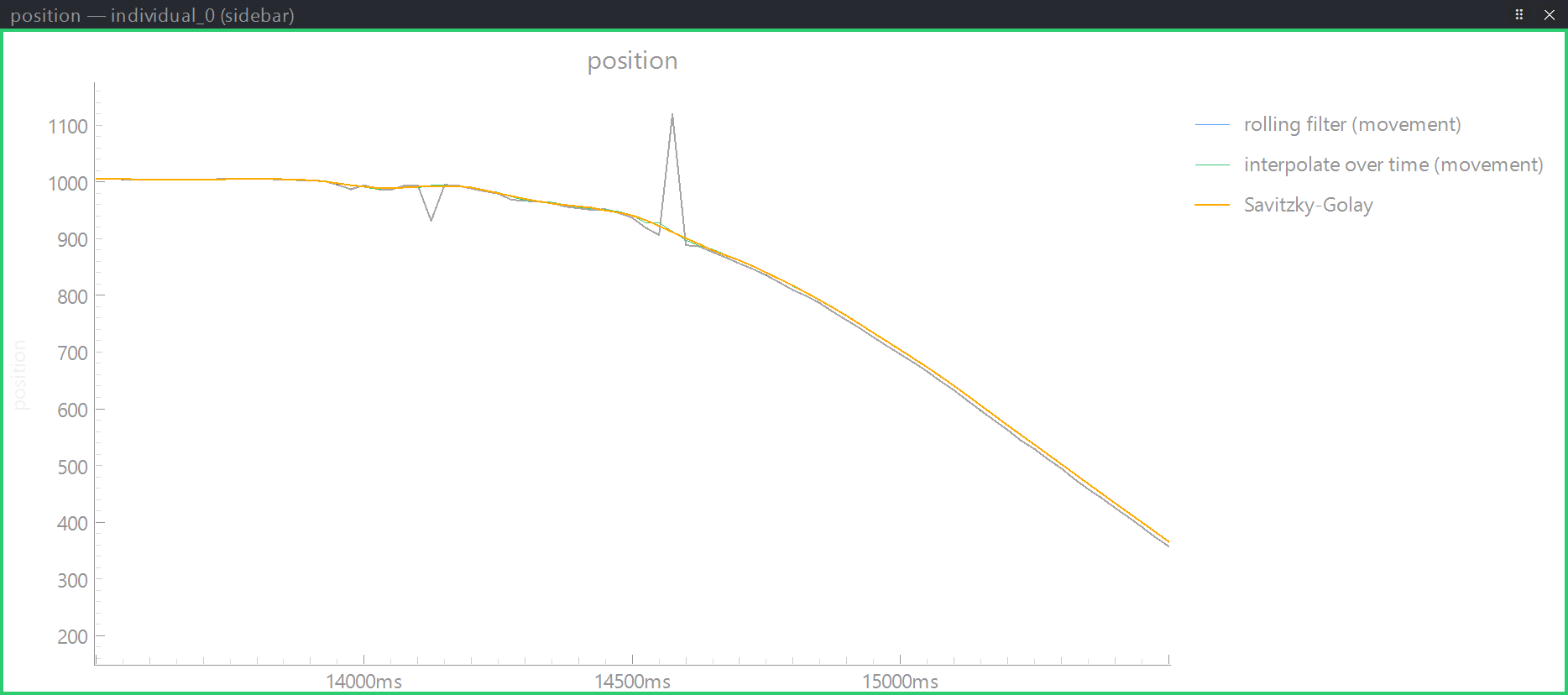
Zoomed on the jumps. The raw trace (grey) has two spikes; every stage draws thin in its own colour, the final result thick in orange. Here the rolling median does the visible work and the later stages lie on top of it: the track has no gaps to interpolate and, at 40 fps, little jitter for the Savitzky-Golay to take out. On a 200 fps pose track the three lines come apart.#
Too wide a window rounds off the peaks and shifts the troughs that changepoint detection relies on; too narrow a one leaves the jitter. Watch the orange line and stop when the small wiggles are gone and the bumps still have their height.
Taking the result with you#
Copy code copies the script on the right. It opens the session, runs the same steps over the whole variable (every keypoint and individual, not just the one previewed) and stores the result as a new variable, e.g.
position_clean. Save and File ▸ Reload data from disk to see it in the GUI; see Editing the dataset while the GUI is open.Send to console runs the same chain in the console panel on the variable bound to the clicked plot, so the cleaned trace is a feature for the current trial without writing anything. Steps from movement take an xarray object, so they are left out of the console line and marked in the script.
The copied script for example 2, wrapped so it writes the trial back, reads:
import ethograph as eto
from movement.filtering import interpolate_over_time, rolling_filter
from ethograph.features.preprocessing import nan_aware, savgol


def smooth(ds):
    x = ds["position"]
    fs = eto.sampling_rate(eto.get_time_coord(x).values)
    x = rolling_filter(x, window=round(0.1 * fs), statistic="median")
    x = interpolate_over_time(x, max_gap=round(1 * fs))
    x = eto.apply_along_time(x, nan_aware(savgol), window_s=0.2, polyorder=2)
    return ds.assign(position_clean=x)


dt = eto.open("wasp/wasp.nc")
dt.update_trial(1, smooth)
dt.save()
movement’s functions take their windows in frames, so the script converts
the seconds you chose with the data’s own rate. Ethograph’s kernels take
seconds directly through eto.apply_along_time, which applies a kernel along
the time axis of an xarray.DataArray, a pynapple Tsd/TsdFrame or
a plain array. nan_aware lets a kernel run across NaNs and puts the gaps
back afterwards, so a lost keypoint stays lost rather than being smeared into
its neighbours.
The dialog remembers the last pipeline, so reopening it on another session starts from the values you settled on.