
Model confidence#
Every predicted label carries a confidence in the labels TSV (a hand-placed
label is 1.0). The review tools threshold on it: the label grid outlines
tiles below Flag confidence below, Histogram… shows where the scores
sit per class, and Tag low-confidence tags exactly those tiles. The
number is computed by the model that made the prediction, and how depends
on the question that model answered — which class is this frame? for a
state event, when did it happen? for a point event.
Confidence - State events#
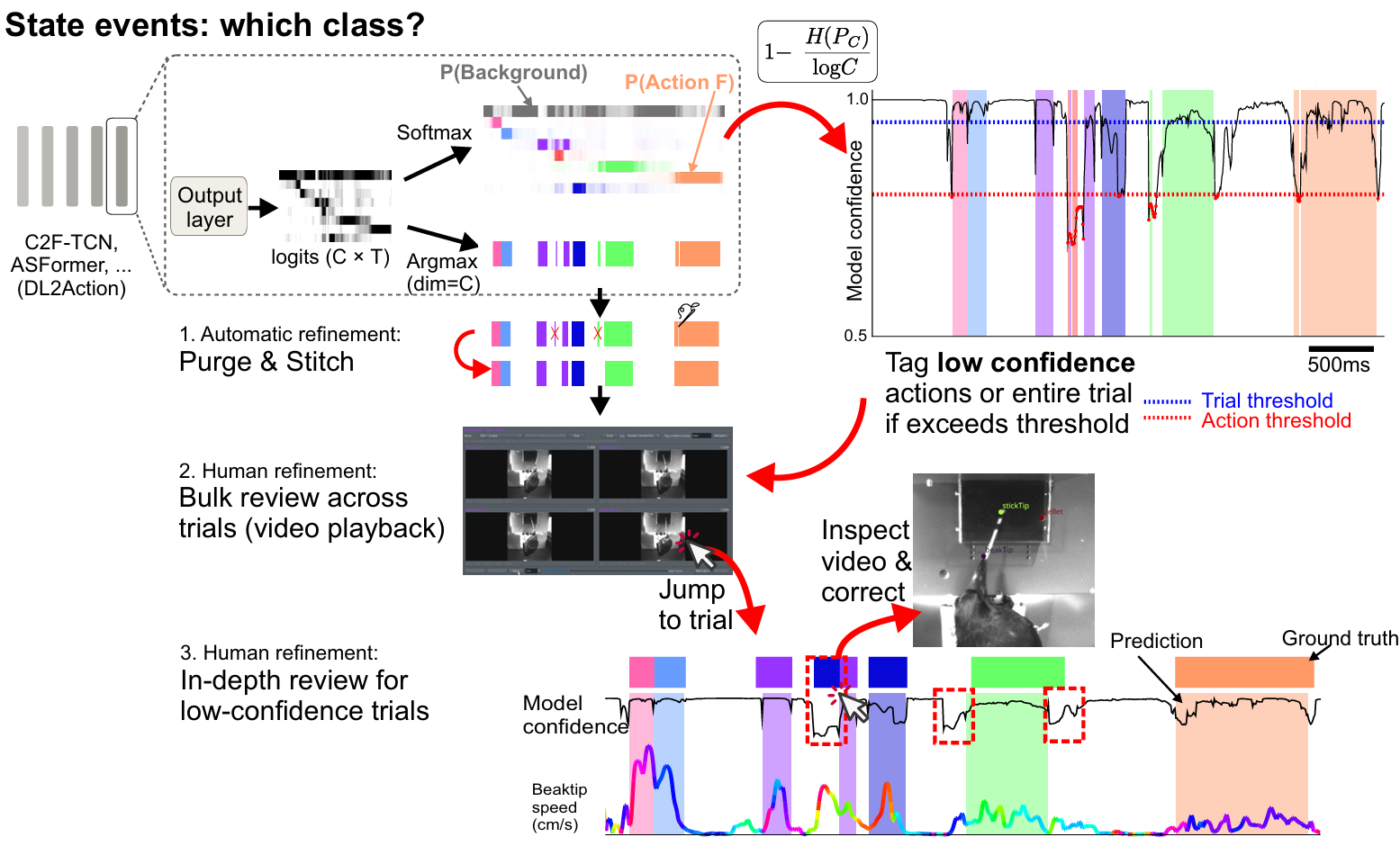
The segmentation pipeline predicts a distribution over the classes at every frame. Its confidence curve dips wherever the model is torn between two classes; a segment’s own confidence is the mean of its class’s probability over its span.#
The segmentation pipeline (eto.segment) outputs one probability
distribution over the \(C\) classes at every frame, \(p_1(t), \dots, p_C(t)\)
with \(\sum_c p_c(t) = 1\), and the label at a frame is the largest. Two numbers
come out of it:
A segment’s
confidencein the TSV is the mean probability of its own class \(c\) over its frames \(S\):\[ \text{confidence} = \frac{1}{|S|} \sum_{t \in S} p_{c}(t). \]The confidence curve drawn under the labels during review is per-frame: one minus the normalised entropy of the distribution.
\[ \text{confidence}(t) = 1 - \frac{H(t)}{\log C}, \qquad H(t) = -\sum_{c=1}^{C} p_c(t)\,\log p_c(t). \]1means all the mass sits on one class,0that every class is equally likely. Its mean over a trial is themodel_confidencecolumn Confidence curves… writes to the metadata table.
Two thresholds: trial and segment#
The two dotted lines in the figure are two cuts, both yours to set:
Trial threshold (blue) — on
model_confidence, the trial’s mean.Segment threshold (red, Action threshold in the figure) — on each label’s own
confidence.
Which cut you review by follows the routine (Full guide):
Trial by trial — both cuts decide, and a trial is opened when either fires: its mean is below the trial threshold, or any one of its labels is below the segment threshold. The mean alone is not enough — a lone doubtful action in a long confident trial barely moves it. The rest are curated whole without being opened: Tools ▸ Labels: Bulk editing… ▸ Only trials the model is confident on takes both numbers and skips every trial either cut touches, so what is left automated afterwards is exactly what to walk with Inspect is enough or
Ctrl+C. The same cut is the Curate trials’ labels workflow step.Label by label (segment review) — the segment threshold decides. In the label or video grid, Flag confidence below outlines every label under it, Tag low-confidence tags them, and Done curates every label above it in one press (Review grids); the tagged ones are the review queue.
Confidence - Point events#
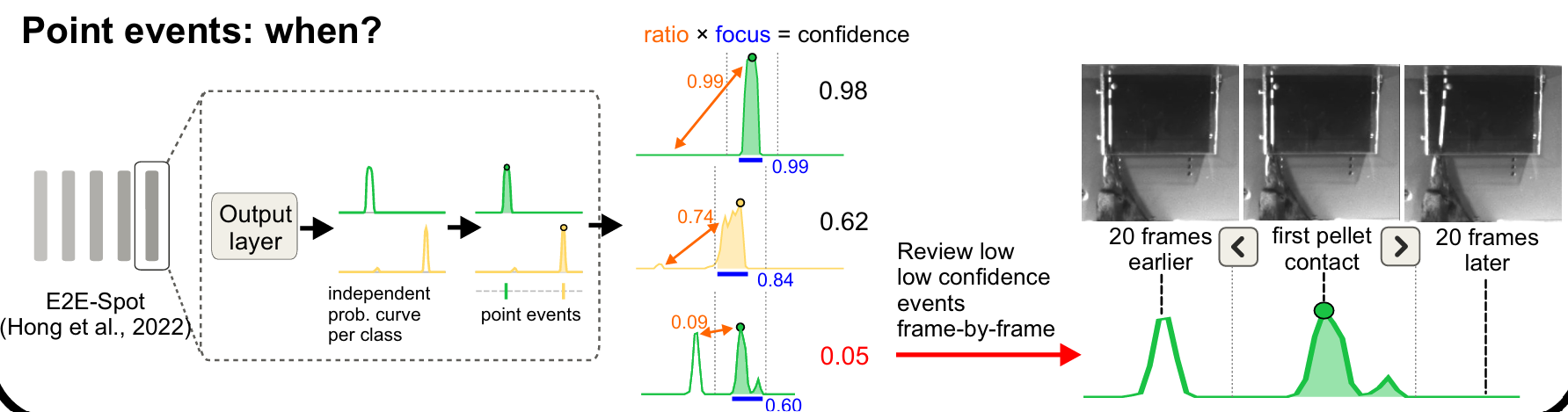
The LightGBM [Ke et al., 2017] and E2E-Spot [Hong et al., 2022] models produce one probability curve per class, and the point event sits on its tallest peak. The confidence is the shape of that curve, not the height of the peak.#
For each class the model produces a curve \(p_k(t)\), the per-frame belief that class \(k\)’s event is here; the prediction is its tallest peak \(t^\ast = \arg\max_t p_k(t)\) (a local maximum — a curve still climbing at the trial’s edge is not a peak). Entropy across classes says nothing useful here: the alternatives are other moments, not other classes. So the confidence is read off the curve’s shape around its peak, within a window \(w\):
focus — the share of the curve’s mass within \(w\) of the peak:
1is one clean bump, lower a broad bump or belief spread elsewhere.ratio — one minus the tallest rival over the peak, a rival being another local maximum outside \(w\) (never the peak’s own shoulder):
1is no rival,0a second candidate as tall as the first. Blind to width by design — width isfocus’s job.peak — the model’s own score \(p(t^\ast)\), kept as a candidate.
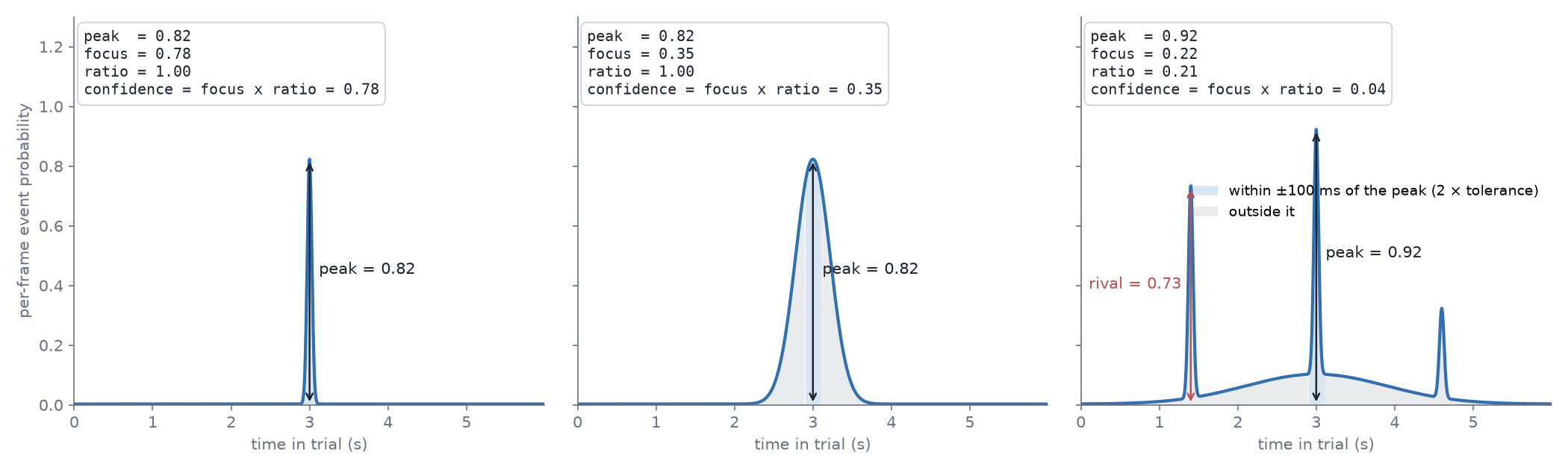
A lone sharp bump reads near 1; a smeared bump pulls focus down, a rival
elsewhere in the trial pulls ratio down.#
The window is your timescale. \(w = 2 \times\) the tolerance the labels are
believed to: the LightGBM model takes it from its own tolerance_s, the pixel
model from infer.focus_window_ms. A bump wider than that is smeared by your
own definition; a peak further away than that is a rival.
A 0 means the model found nothing. A curve with no interior peak, or
higher at an edge than at any peak inside it, reads 0 under every rule: the
event may lie past the trial’s end, so the label is written and flagged
rather than dropped. A curve that never rises above infer.min_peak writes
no label at all — the class is absent from that trial. Why a model places one
event per class per trial, where that floor sits and how several events per
trial change what a rival is, are on From probabilities to events.
Focus vs ratio#
Which reading is the confidence is a review preference, so it is set where its effect is seen: the Histogram… popup of the label grid and the video grid carries a Confidence rule panel above the bars whenever the session has a prediction run with curves beside it (every run merged, newest per class).
Rule —
focus × ratio(the default),ratioalone (one candidate or two),focusalone (sharp or smeared),peak, or custom:ratio × (α + (1 − α)·focus)with one slider — α = 1 isratio, α = 0 the product.Same event within — the window \(w\) in ms.
Every change redraws the histogram and restyles the grid’s tiles at once, with
the threshold line in the same picture. Apply to labels writes the values
into the labels — only automated labels that have a curve; manual and curated
ones are a human’s word and never change — as one undo step per trial
(Ctrl+Z takes it back). Closing without applying puts the original values
back. The rule, α and window are remembered across sessions.
Copy for project.yaml puts the same choice on the clipboard as the
infer: lines of a spot project config, so the next inference() writes
confidence the way the review settled on and the grid and the pipeline never
disagree about what the number means (infer.confidence,
infer.confidence_alpha for the custom rule):
infer:
  confidence: ratio
  focus_window_ms: 100
Reviewing by confidence#
How the grids sort, flag and pre-click on this number is on the review grids page, under Reviewing by confidence.